CDFW License
RA Outdoors, LLC d/b/a AspiraSports
4.065.00 Reviews
- Version
- 2607.3.3
- Installs
- 50.00K
- Age Rating
- Everyone
Screenshots
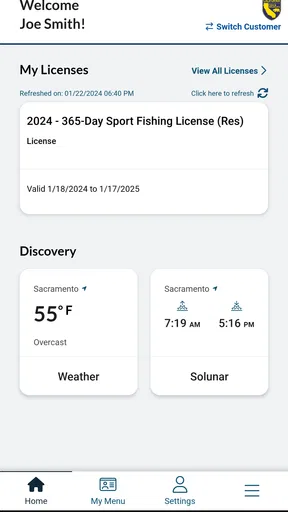
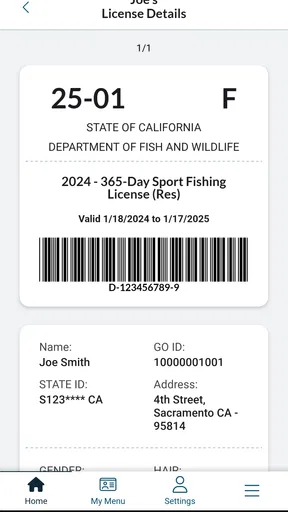
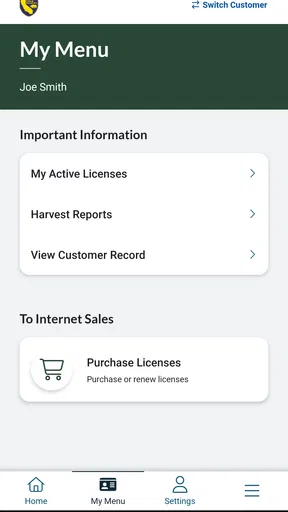
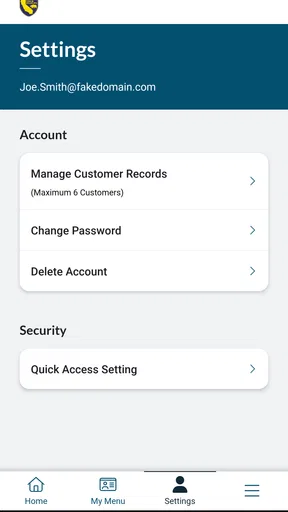
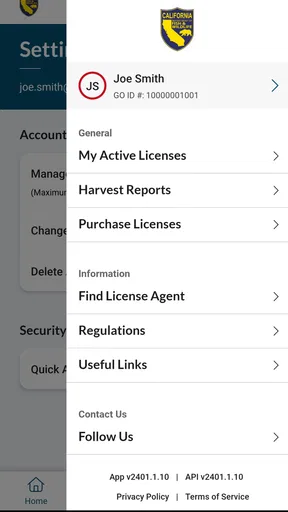
Our Review of CDFW License
 Analysis by Appyee
When I use a state licensing app, I am not looking for entertainment or a complicated dashboard. I want to complete an important outdoor task without carrying extra paperwork or stopping my plans to find a computer. CDFW License is built around that practical need: it is a sports app from RA Outdoors, LLC d/b/a Aspira for California Department of Fish and Wildlife license applications. My overall impression is that it makes the mobile part of the process more convenient, while also reminding me that a licensing tool depends heavily on a reliable connection and careful preparation.
The app is free and rated for Everyone, which makes it approachable for a broad range of users. It has reached over 50 thousand installs, with a 4.0 average from around 126 ratings and 65 reviews. Those figures suggest a useful but not universally effortless experience. I would recommend it most to California residents and visitors who regularly handle fishing, hunting, or other CDFW-related licensing tasks from a phone. I would be more cautious about relying on it as the only part of a last-minute outdoor plan.
How CDFW License fits into real outdoor plans
The strongest reason to use this app is convenience before heading outside. Instead of treating licensing as a separate office chore, I can handle it from the same device I already use for maps, weather, messages, and trip planning. That is particularly helpful when plans change quickly. A weekend outing may start as a casual idea and become a confirmed trip later in the week; having a dedicated CDFW application route makes it easier to deal with the administrative side before leaving home.
In my experience, the best workflow begins while I am still on a stable home or office connection. I would open the app, review the available application path, enter information slowly, and check every personal detail before moving on. This is not the kind of task I want to rush beside a trailhead. A larger screen may be more comfortable for reading and checking long forms, but the phone is more convenient when I am away from a desk.
The app’s role is focused rather than broad. It is not a general outdoor planner, a navigation tool, or a social hunting and fishing community. That narrow purpose is a benefit when I simply need the California Department of Fish and Wildlife licensing process in a mobile format. It is also a limitation if I expect one app to organize permits, maps, regulations, weather, equipment, and trip communication together.
Where connectivity matters most
The first important connection point is opening and using the application process. A licensing request generally involves exchanging information with an online service, so I treat a working network as part of the basic requirement rather than an optional extra. On a strong connection, the experience feels like a straightforward digital form. On a weak connection, delays become more stressful because I may not know whether a screen is still loading or whether my previous action was accepted.
This matters in mobile contexts where service can change from one location to another. A user may begin an application at home, continue it in a vehicle, and then reach an area with limited coverage. I would not choose that moment to start from scratch. The safer approach is to complete the important steps before travel, while the phone has dependable access, and then avoid assuming that a remote destination will provide the same experience.
There is also a psychological difference between a normal shopping app and a licensing app. If a retail page takes a moment to load, I can try again later. If I am preparing for an outing and need confidence that my licensing task is complete, uncertainty is more uncomfortable. I therefore pay close attention to confirmation screens and any visible completion message instead of closing the app immediately after tapping a button.
A realistic mobile scenario
Imagine that I decide on a fishing trip after work. I am standing in a supermarket parking lot, using mobile data, and trying to finish the application before driving toward the water. That is exactly the kind of situation where the app can save time, but it is also where I would be most careful. Parking lots can have crowded networks, mobile coverage can fluctuate, and distractions make it easy to mistype a name or select the wrong option.
My preferred version of that scenario is to use the app earlier in the day, preferably indoors on a stable connection. If I must use it from the car, I would remain parked, disable distractions, and wait for each page to finish before continuing. I would keep the phone charged and retain any confirmation information that the application presents. The important insight is that the app reduces the need for a computer, but it does not remove the need for a calm, connected setup.
For a family outing, I would also avoid passing the phone around while entering details. A single person should review the application carefully, especially when several people are involved. Small-screen forms are convenient, but they can make it harder to compare names, dates, and selections at a glance. I find that reading the final information once more before submitting is worth the extra minute.
What happens when the connection fails
The main weakness of a network-dependent licensing workflow is that failure can be ambiguous. A page may stop responding, a submission may appear slow, or the app may return to an earlier screen. In that situation, repeatedly tapping the same control is not a good habit. It can create confusion about whether an action was submitted once, more than once, or not at all.
My recovery routine is simple. I first stop tapping and check whether the screen changes. If the app remains stuck, I note where I was in the process, verify the phone’s connection, and reopen the relevant part carefully. I would not assume that closing the app means the task failed, and I would not assume that reaching the next screen automatically proves everything is complete. Looking for a clear confirmation is the safer approach.
If I lose coverage outdoors, I would postpone the licensing task rather than treating the app as a guaranteed solution for an offline environment. The application is useful as a mobile access point, but I would not build a remote trip around the expectation that every step will work without communication with the service. This is especially important for users who travel into areas where cellular service is unpredictable.
Another practical recovery tip is to keep the phone’s operating system compatible and the application current. The listed minimum operating system is Android 8.0, and the current version is 2607.3.3. I would check the app before an important trip rather than waiting until departure day. That gives me a chance to discover update prompts, sign-in friction, or connection problems while I still have time to solve them.
Using mobile data without wasting it
A licensing form is not the same as streaming video, so I would not expect ordinary use to be especially demanding in terms of data. Still, people on limited plans should avoid treating every mobile task casually. I would complete the process on Wi-Fi when practical, especially if the app needs to load several pages or refresh account information. This is less about the app being unusually data-heavy and more about avoiding unnecessary uncertainty on a weak mobile connection.
There is a useful trade-off here. Wi-Fi can provide a steadier connection, but a private home network is not the only consideration; I also want to protect personal information while completing an official application. If I am using public Wi-Fi, I prefer a trusted connection and a quiet environment rather than entering details hurriedly on an open network. Mobile data may be more private in some situations, but coverage and reliability can be worse. I choose based on both stability and context.
I also avoid repeatedly reopening the same screens just to check whether something changed. That habit can consume time and data without improving confidence. A better routine is to finish one stage, wait for the result, save or note the confirmation presented by the app, and then move on. This makes the process easier to audit later and reduces needless refreshes.
For trips into remote areas, I prepare before leaving coverage. I would not assume that a screenshot, cached page, or previously viewed screen automatically replaces whatever documentation or confirmation the licensing process requires. The app can be part of preparation, but I still follow the instructions shown during the process and keep any relevant evidence available in a sensible way.
Who will appreciate it most
CDFW License is a good match for someone who wants a focused California licensing tool on a phone. It is especially practical for users who dislike dealing with forms on a desktop, people who make outdoor plans away from home, and anyone who wants the application process available alongside the rest of their mobile trip preparation. The free price removes an obvious barrier, and the Everyone rating makes it suitable for general household use.
I also see value for experienced outdoor users who already understand what authorization they need and simply want a convenient way to handle the application. For them, the app can shorten the distance between deciding to go and completing the necessary administrative step. The important advantage is not a collection of extra outdoor features; it is having a dedicated mobile route for this particular California process.
Who should choose another approach
I would hesitate to recommend relying on this app alone to someone who regularly travels beyond cellular coverage and cannot complete licensing tasks in advance. That user may prefer handling the process earlier through a more stable setup and treating the phone as a convenience rather than the only available method. The same advice applies to people who find small-screen forms tiring or who need to manage complicated information for several participants at once.
It may also be the wrong choice for someone expecting a complete fishing or hunting companion. Because its purpose is licensing, it should not replace a dedicated navigation app, a regulation reference, a weather service, or a communication plan. I would use it alongside those tools, not instead of them. A focused app is often easier to understand, but focus means it cannot answer every question that arises during an outdoor trip.
My final view of the connected experience
After using CDFW License as a practical mobile utility, I see its value in preparation rather than improvisation. It gives California Department of Fish and Wildlife licensing a place on the phone, which is more convenient than waiting for access to a computer. The experience is strongest when I have a stable connection, enough time to check my entries, and a clear idea of what I need before starting.
The connection requirement is the central trade-off. The app can make the licensing process more accessible, but a remote location, weak signal, or rushed submission can turn convenience into uncertainty. My advice is to complete important steps before leaving reliable coverage, confirm the result carefully, and avoid assuming that a previously opened screen will work as an offline substitute.
With that realistic approach, I think this free sports app is worth trying for California outdoor users who want a focused licensing option. Its 4.0 average reflects a generally useful experience rather than a flawless one, and that matches my judgment: it is most valuable as a prepared, connected tool. I would install it before a trip, test the workflow while online, and keep other essential outdoor resources separate so that one mobile application is never carrying more responsibility than it can reasonably handle.
Verdict
Strengths of CDFW License
- Official access to California fishing and wildlife licensing services.
- Supports digital license management from a mobile device.
- Reduces the need to carry paper documents while outdoors.
- Useful for checking license details before a fishing trip.
- Convenient for users who regularly visit California lakes and rivers.
Limitations of CDFW License
- Primarily useful only to California residents and visitors with state licenses.
- Requires internet access for some account and license functions.
- The interface may feel basic compared with broader outdoor apps.
- Not a replacement for maps, fishing reports, or trip-planning tools.
- Users must still follow all current regulations and carry required credentials.
Similar Picks in This Category
View All
BeSoccer: Soccer Live Score
BeSoccer apps4.3

Cricbuzz - Live Cricket Scores
Cricbuzz.com3.7

NFL
NFL Enterprises LLC2.4

Da Fit
MO YOUNG LIMITED3.6

ESPN
Disney4.5

LiveScore: Live Sports Scores
LiveScore Limited4.5
Frequently Asked Questions
What is the CDFW License app used for?
CDFW License is designed to help users access and manage California Department of Fish and Wildlife licensing services from a mobile device. Depending on the available features and your account type, you may be able to purchase or display licenses, review permits, and keep important fishing or hunting information available while traveling. It is intended to make license management more convenient, but it does not replace understanding California’s current regulations.
Can I use a digital CDFW License instead of carrying a paper copy?
The app may allow eligible licenses or documents to be displayed digitally, which can be useful when you are outdoors and do not want to carry additional paperwork. However, acceptance can depend on the specific license, activity, enforcement requirements, and current California Department of Fish and Wildlife rules. Before relying only on the app, users should check the official CDFW guidance and consider carrying any required physical documents or identification.
Do I need an account to use CDFW License?
Some functions may be available without completing a full account setup, but purchasing, retrieving, or managing personal licenses generally requires users to provide identifying information and sign in or create an account. The exact process can vary depending on the service and license type. Make sure the information in your profile matches your official documents, and use a secure connection when entering personal or payment details.
Does CDFW License work without an internet connection?
Internet access may be required for signing in, purchasing licenses, synchronizing account information, or downloading updated documents. Once information has been loaded, certain features might remain visible temporarily, but users should not assume that every license or permit will be available offline. Outdoor activities often take place in areas with weak reception, so open the app beforehand and confirm that the necessary documents are accessible.
Is CDFW License free to download, and are there additional fees?
The application itself may be free to download, but downloading it does not make fishing, hunting, or other wildlife-related licenses free. License prices, application charges, transaction fees, and special permit costs are determined by the California Department of Fish and Wildlife and can change over time. Review the final purchase summary carefully, and verify that you are using the official app or CDFW website before submitting payment.
